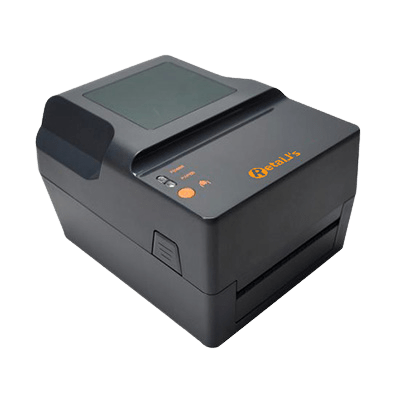
Retails Barcode Label Printer
Model: LP-502
* Fashion appearance
* With high speed, excellent stability and durability
* Paper detection by transmission type, accurately and rapidly
* Powerful function, support parallel, serial, USB multiple interfaces
* Imported thermal printer head, printing clearly and stable
* With function for automatic correction paper and carbon
* Simple and easy to replace paper and carbon belt
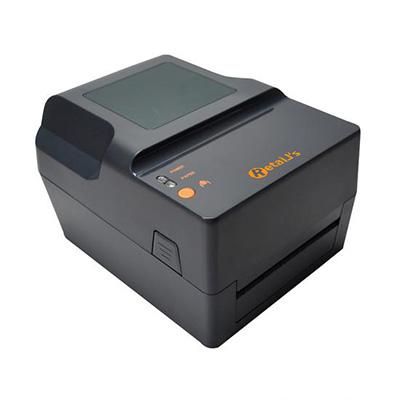
Retails Barcode Label Printer LP-502
| Printing | Resolution | 203dpi (High Resolution and High Speed) |
| Printing method | Thermal Transfer/Direct Thermal | |
| Printing speed | 4-5 Inch/s | |
| Max printing width | 104mm (4.09 ) | |
| Max printing Length | 2286mm (90 ) | |
| Interface | U、US、USPE(USB+ Serial+Parallel+Ethernet) | |
| Commands | TSC | |
| Ribbon Length | Max 300M | |
| Ribbon width | Min. 30mm; Max. 110mm | |
| Media | Max Media Roll OD | 127mm (5″ ) |
| Min Media Roll ID | 25mm | |
| Media Paper Type | Continuous, gap, fan hold, black mark, | |
| Media Rolling Up Method | Printing side outward Rolling | |
| Media width | Max 120mm (4.72″), Min: 20mm (0.78″) | |
| Media Roll Core Size | 25.4mm~38mm | |
| Media Gap | Min.2mm | |
| Media Thickness | 0.058mm~0.305mm | |
| Label Length | 10mm~2286mm | |
| Accessories | External Media Holder (Optional) | |
| Software | Editing Software | Nicelabel SE |
| Driver | Windows 2000、XP、Vista、Win7、Win8、Windows Server 2003&2008 | |
| Character font | Character Set | GB18030 (Simplified Chinese) |
| Print font | ASCII Font A: 12*24 | |
| ASCII Font B: 9*24 | ||
| Chinese: 24*24 | ||
| Environment | Temperature | Working: 5-45°C, Storage: -10~50°C |
| Specification | Humidity | Working : 25%~85% ; Storage: 10%~90% |
| Power supply | Input: AC 110V/240V, Output: DC24V/2.5A,60W | |
| Storage | 4MB | |
Retails LP-502 Barcode Label Printer Price
High-Speed Performance for Seamless Operations
Experience a new level of efficiency with the Retails LP-502 Barcode Label Printer. Designed to meet the needs of modern businesses, this printer combines fashion-forward aesthetics with outstanding functionality. With its high-speed capabilities, this printer ensures smooth and swift printing, allowing you to save valuable time and resources.
Say goodbye to delays and disruptions during your operations. The LP-502 features paper detection by transmission type, guaranteeing accurate and rapid printing. This advanced technology not only enhances your productivity but also eliminates errors, ensuring that your labels are printed with precision and clarity.
Unparalleled Durability and Versatility
The Retails LP-502 Barcode Label Printer is built to withstand the demands of a dynamic work environment. Its exceptional stability and durability make it a reliable companion for your business needs. Whether you operate in a bustling retail store, a fast-paced warehouse, or a busy shipping center, this printer is up to the task.
Equipped with a powerful range of functions, the LP-502 supports multiple interfaces, including parallel, serial, and USB connections. This versatility enables seamless integration with your existing systems, ensuring a hassle-free setup and operation.
User-Friendly Design for Effortless Performance
Simplicity meets innovation with the Retails LP-502 Barcode Label Printer. Its fashion-forward appearance is not just about looks; it embodies an intuitive design that prioritizes user convenience. Printing labels has never been easier.
Thanks to the imported thermal printer head, your labels are not only printed clearly but also maintain stable quality throughout. No more worrying about smudged or blurry barcodes. With the LP-502, your labels will be sharp and easily scannable, ensuring a seamless experience for your customers.
Replacing paper and carbon is a breeze with the LP-502’s automatic correction feature. Say goodbye to time-consuming and frustrating manual adjustments. This printer streamlines the process, allowing you to focus on what truly matters—growing your business.
Retails Barcode Label Printer LP-502 Driver Download
To maximize the performance of your Retails Barcode Label Printer LP-502, it is crucial to download and install the appropriate driver. Here’s a step-by-step guide to help you with the process:
-
Click Download Driver:
- You can easily find their website by searching for “Retails Barcode Printers” on your preferred search engine.
-
Navigate to the Downloads Section:
- Once you’re on the website, navigate to the “Downloads” or “Support” section.
- Look for the LP-502 driver specifically, as there might be multiple models available.
-
Select the Correct Operating System:
- Identify your operating system (e.g., Windows, macOS, or Linux) and choose the corresponding driver.
-
Start the Download:
- Click on the download link or button provided to initiate the driver download.
- Ensure that you have a stable internet connection to avoid interruptions.
-
Install the Driver:
- Once the download is complete, locate the downloaded file on your computer.
- Double-click on the file to start the installation process.
- Follow the on-screen instructions to complete the installation.
-
Connect and Configure the Printer:
- After the driver installation, connect your LP-502 printer to your computer using the appropriate cable or wireless connection.
- Configure the printer settings based on your requirements and preferences.
Retails LP-502 Barcode Label Printer Driver Download
Congratulations! You have successfully downloaded and installed the Retails Barcode Label Printer LP-502 driver. You are now ready to utilize the printer’s full potential.